When authenticating using a pre-shared key, you can choose whether the remote peer uses a user-defined IKE ID or its IP address. strongSwan Version 4 checks here, for the "" option, whether the IKE ID and the IP address from which the connection originates are identical. If it is detected that the remote peer is behind a NAT router, the connection does not originate from the externally visible IP address itself and therefore cannot be used as an IKE ID in this case.
In strongSwan version 6, however, only IKE IDs specified at the time of configuration are checked. For peers with a static IP address, the specified IP address is therefore expected to serve as the IKE ID. For peers configured via DNS hostname or peers with a dynamic IP address, however, any IKE ID is accepted.
It is therefore recommended to always use custom IKE IDs instead of IP addresses, as these are independent of IP addresses and the software versions being used. Experience has shown that custom IKE IDs of the email address type offer the highest level of compatibility and uniqueness and are therefore recommended. See also Section 43.4, „IKE IDs“.
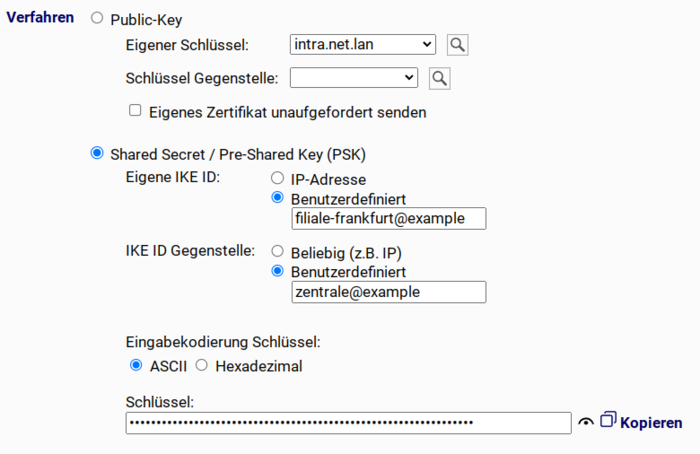
If IP-based IKE IDs are used, they can also be used with remote peers behind NAT routers in strongSwan version 6, since no check is performed to verify the relationship between the IKE ID and the IP address from which the connection originates.
If multiple tunnels are to be established to the same remote peer, multiple connections must be created in the Intra2net system user interface. However, at the IKE protocol level, these connections must be grouped. strongSwan version 4 performs this grouping dynamically at runtime and can therefore, for example, group remote peers configured using DNS hostnames with those configured using IP addresses.
In strongSwan version 6, connection grouping must always occur at configuration time. It must therefore be possible to determine whether a remote peer is the same or different based solely on the configured parameters.
Combining the following three settings may cause grouping issues:
Type of remote host: DNS hostname or dynamic IP
Authentication using a Pre-Shared Key
IKE ID of the remote peer: "Any (e.g. IP)"
If there are multiple connections with identical combinations, it is not clear at the time of configuration whether they correspond to the same or different remote peer.
In this case, set the IKE ID to "" and use unique IKE IDs for all peer devices. Experience has shown that custom IKE IDs based on email addresses offer the highest level of compatibility and uniqueness and are therefore recommended. See also Section 43.4, „IKE IDs“.
If a Perfect Forward Secrecy (PFS) group is configured for Phase 2 in an IKEv1 encryption profile and the other party establishes the connection, strongSwan version 4 accepts any PFS group in this case, not just the one that was configured. It only ensures that a PFS group is used at all.
In strongSwan version 6, this behavior can be configured. In the "" menu, you can use the "" option to choose whether or not you want this behavior. When upgrading from strongSwan version 4 to 6, this option is automatically enabled to avoid disrupting existing connections.
The mode-config protocol is used in IKEv1 to transmit settings such as IP addresses and DNS servers to VPN clients when establishing a connection. strongSwan version 4 supports it exclusively in the "" variant.
strongSwan version 6 supports mode config in both "" and "" modes. However, it is strongly recommended that you use only the "" mode, as it is more robust against interference when establishing a connection.
Both NCP and Apple iOS VPN clients support both modes and can automatically select the correct one. Therefore, connections to these clients on the Intra2net system are automatically switched to "" as soon as strongSwan version 6 is activated.
The Shrew Soft VPN client also supports both modes, but it cannot automatically detect which mode is being used on the Intra2net system. It is therefore recommended that, when upgrading to strongSwan version 6, you switch all Shrew Soft VPN clients to "" mode as soon as possible (under the "" tab, "" option in the connection configuration on the client) and to adjust this simultaneously on the Intra2net system in the "" menu.
strongSwan version 4 sends a welcome message via mode config when VPN clients establish a connection. Most VPN clients display this message in a pop-up window.
strongSwan version 6 cannot display this welcome message, so it has been removed without replacement.
In strongSwan version 4, Pre-Shared keys can only be entered using ASCII encoding. Therefore, only a limited set of characters is available.
strongSwan version 6 also allows Pre-Shared Keys to be entered in hexadecimal format, making it more flexible.
strongSwan version 4 can process fragmented packets sent by the other end at the IKE level, but cannot fragment packets itself. Depending on their size and the Path MTU, these packets may then be fragmented at the UDP level. In conjunction with overly strict or misconfigured routers and firewalls, this can sometimes lead to problems establishing a connection.
strongSwan version 6 can process fragmented IKE packets and send them itself when necessary. This ensures a more robust connection establishment.